[](https://github.com/stride3d/stride/actions/workflows/main.yml)
[](https://discord.gg/f6aerfE)
[](#contributors)
[](https://opencollective.com/stride3d)
[](https://github.com/stride3d/stride/blob/master/LICENSE.md)
[](CODE_OF_CONDUCT.md)
# Welcome to the Stride Game Engine
Stride is an open-source C# game engine designed for realistic rendering and VR. Highly modular, it aims to give game makers more flexibility in their development. Stride comes with an editor, [Game Studio](https://doc.stride3d.net/latest/en/manual/game-studio/index.html), which allows you to create and manage the content of your games or applications visually and intuitively. To learn more about Stride, visit [stride3d.net](https://stride3d.net/).
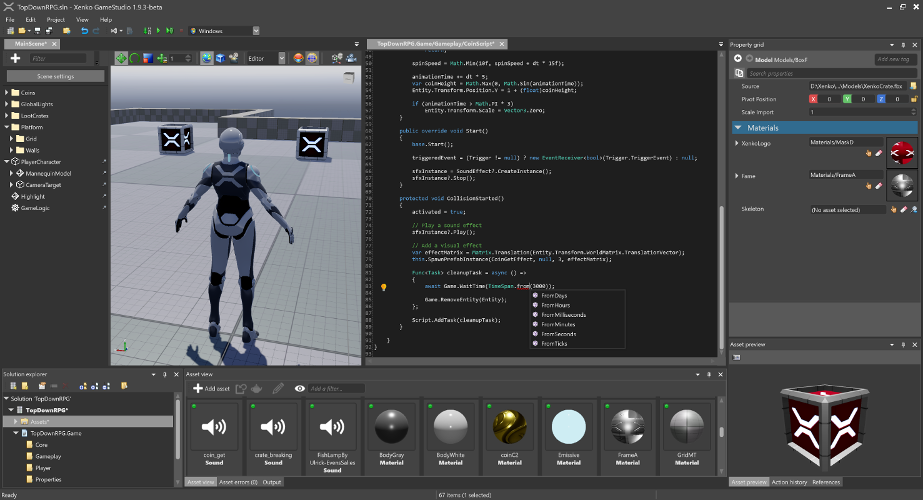
This README is intended for users who want to build the Stride engine from source or contribute to its development. If your goal is to create games using Stride, we recommend visiting the [Get started with Stride](https://doc.stride3d.net/latest/en/manual/get-started/index.html) guide. There, you'll find detailed instructions on downloading, installing, and getting started with game development in Stride.
## 🚀 Try the CLI templates
Create a Stride project from the command line — no editor required:
```bash
# Blank starter
dotnet new install Stride.Templates.Games
dotnet new stride-game -n MyGame
cd MyGame && dotnet run --project MyGame.Windows
```
Or start from a genre-specific starter (FPS, 2D platformer, top-down RPG, third-person platformer, VR):
```bash
dotnet new install Stride.Templates.Games.Starters
dotnet new stride-fps -n MyShooter
cd MyShooter && dotnet run --project MyShooter.Windows
```
See [`sources/templates/README.md`](sources/templates/README.md) for the full template catalog (genre starters, 18 feature demos, tutorials) and the local-development workflow.
## 🤝 Contributing
Want to get involved? See our [Contributing section](.github/CONTRIBUTING.md) for how to ask questions, report bugs, submit pull requests (including good first issues), and how you can earn money by contributing via funded tasks/bug bounties.
## 🗺️ Roadmap
Our [Roadmap](https://doc.stride3d.net/latest/en/contributors/roadmap.html) communicates upcoming changes to the Stride engine.
## 🛠️ Building from Source
### Prerequisites
1. **Latest [Git](https://git-scm.com/downloads)** — the Windows installer includes Git LFS by default; make sure it stays enabled. For convenience, you can also use a UI client like [GitExtensions](https://gitextensions.github.io/).
2. **[Visual Studio 2026](https://visualstudio.microsoft.com/downloads/)** (Community edition is free), with these two workloads:
- **.NET desktop development** (bundles the .NET 10 SDK)
- **Desktop development with C++**
> See [docs/build/README.md](docs/build/README.md) for detailed prerequisites (specific MSVC toolset versions, optional iOS/Android/ARM64/VSIX components, command-line builds without VS, and troubleshooting).
### Build Stride
1. `git clone https://github.com/stride3d/stride.git`
2. Open `build\Stride.sln` in Visual Studio 2026.
3. Build the `Stride.GameStudio` project (default startup, in the `60-Editor` folder) or run it directly from the toolbar.
### Contribution Guidelines
Please check our [Contributing Guidelines](https://doc.stride3d.net/latest/en/contributors/index.html).
## 🔬 Build Status
| Build | Status |
|:--|:--:|
| Windows | [](https://github.com/stride3d/stride/actions/workflows/build-windows-runtime.yml) |
| Linux Vulkan/OpenGL | [](https://github.com/stride3d/stride/actions/workflows/build-linux-runtime.yml) |
| iOS | [](https://github.com/stride3d/stride/actions/workflows/build-ios.yml) |
| Tests (Simple) | [](https://github.com/stride3d/stride/actions/workflows/test-windows.yml) |
| Tests (Game/WARP) | [](https://github.com/stride3d/stride/actions/workflows/test-windows.yml) |
## 📖 Stride Documentation Landscape
The Stride documentation is organized across different locations. Here's how it's structured:
1. [Stride Game Engine](https://github.com/stride3d/stride) - The main repository for Stride.
- [Contributing to Stride](https://doc.stride3d.net/latest/en/contributors/engine/index.html) - A guide for developers interested in contributing to or developing the Stride engine.
1. [Stride Website](https://www.stride3d.net/) - The official site showcasing Stride, featuring:
- [Features](https://www.stride3d.net/features/)
- [Blog](https://www.stride3d.net/blog/)
- [Community](https://www.stride3d.net/community/)
- [Download](https://www.stride3d.net/download/)
- [Sponsor](https://www.stride3d.net/sponsor/)
- [Contributing to the Website](https://doc.stride3d.net/latest/en/contributors/website/index.html) - Guide for contributing to the Stride website.
2. [Stride Docs](https://doc.stride3d.net/) - The official documentation, including:
- [Manual](https://doc.stride3d.net/latest/en/manual/index.html)
- [Tutorials](https://doc.stride3d.net/latest/en/tutorials/index.html)
- [Release Notes](https://doc.stride3d.net/latest/en/ReleaseNotes/ReleaseNotes.html)
- [Ways to contribute](https://doc.stride3d.net/latest/en/contributors/index.html)
- [API Reference](https://doc.stride3d.net/latest/en/api/index.html)
- [Community Resources](https://doc.stride3d.net/latest/en/community-resources/index.html) - Demos, articles, shaders, physics examples, and more.
- [Contributing to the Docs](https://doc.stride3d.net/latest/en/contributors/documentation/index.html) - Guide for contributing to the Stride documentation.
4. [Stride Community Toolkit](https://stride3d.github.io/stride-community-toolkit/index.html) - A set of C# helpers and extensions to enhance your experience with the Stride game engine.
- [Contributing to Toolkit](https://github.com/stride3d/stride-community-toolkit) - Contribute to or explore the toolkit's source code.
## 🌐 .NET Foundation
This project is supported by the [.NET Foundation](http://www.dotnetfoundation.org).
## 🛡️ License
Stride is covered by the [MIT License](LICENSE.md) unless stated otherwise (i.e. for some files that are copied from other projects). You can find the list of third-party projects [here](THIRD%20PARTY.md). Contributors need to sign the following [Contribution License Agreement](https://github.com/dotnet-foundation/.github/blob/main/CLA/dotnetfoundation.yml).
## ✨ Contributors
Thanks to all these wonderful people who have contributed to Stride!