# RapidTTS
**Repository Path**: RapidAI/RapidTTS
## Basic Information
- **Project Name**: RapidTTS
- **Description**: A cross platform implementation of Text-to-Speech based on PaddleSpeech and ONNXRuntime
- **Primary Language**: Unknown
- **License**: Apache-2.0
- **Default Branch**: main
- **Homepage**: None
- **GVP Project**: No
## Statistics
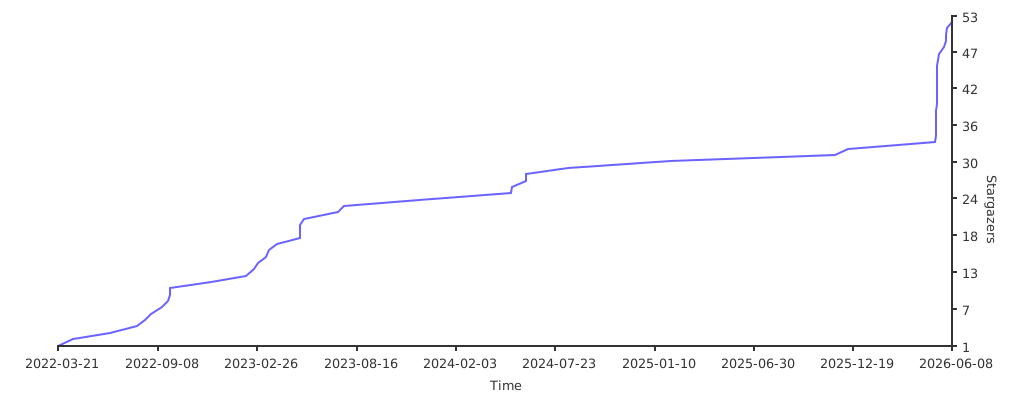
- **Stars**: 3
- **Forks**: 1
- **Created**: 2022-04-23
- **Last Updated**: 2026-05-30
## Categories & Tags
**Categories**: Uncategorized
**Tags**: 文本转语音, TTS
## README
## 简介
RapidTTS 是一个轻量级文本转语音工具,面向本地快速推理。当前默认后端是 `kokoro_onnx`,同时支持 `melo_onnx` 和 `moss_nano_onnx`。
## 特性
- 支持 Kokoro ONNX, MeloTTS ONNX 和 MOSS Nano ONNX 推理
- 支持中文、英文和中英混合文本
- 支持查询模型语言、默认参数和音色能力
- 模型文件可自动下载,并使用 SHA256 校验
- 同时提供 Python API 和命令行工具
## [在线 demo](https://www.modelscope.cn/studios/RapidAI/RapidTTS/summary)
 ## 安装
默认推荐安装 Kokoro ONNX 后端:
```bash
pip install "rapidtts[kokoro]"
```
使用 MOSS Nano ONNX 时安装对应 extra:
```bash
pip install "rapidtts[moss_nano]"
```
其他安装方式见 [安装说明](docs/installation.md)。
## 快速使用
### Python API
```python
from rapidtts import RapidTTS, SynthesisRequest
tts = RapidTTS()
resp = tts.synthesize(SynthesisRequest(text="你好,RapidTTS"))
resp.save("outputs/1.wav")
```
指定模型和音色:
```python
from rapidtts import RapidTTS, SynthesisRequest, TTSModel
tts = RapidTTS(model=TTSModel.KOKORO_ONNX)
resp = tts.synthesize(
SynthesisRequest(
text="你好,RapidTTS",
voice="zm_009",
)
)
resp.save("outputs/zm_009.wav")
```
使用 MOSS Nano 内置音色:
```python
from rapidtts import RapidTTS, SynthesisRequest, TTSModel
tts = RapidTTS(model=TTSModel.MOSS_NANO_ONNX)
resp = tts.synthesize(
SynthesisRequest(
text="你好,RapidTTS",
voice="Junhao",
)
)
resp.save("outputs/moss_nano_junhao.wav")
```
当前 MOSS Nano 内置音色:
```text
Junhao, Zhiming, Weiguo, Xiaoyu, Yuewen, Lingyu, Trump, Ava, Bella, Adam, Nathan, Soyo, Saki, Mortis, Umiri, Mei, Anon, Arisa
```
MOSS Nano 也支持通过 `extras["prompt_audio_path"]` 传入参考音频。首次使用参考音频时会自动下载 `prompt_audio_encoder` 可选模型文件组。
更多示例见 [Python API](docs/python_api.md)。
### 命令行
```bash
rapidtts text "你好,RapidTTS" outputs/1.wav
```
指定模型:
```bash
rapidtts text "你好,RapidTTS" outputs/kokoro.wav --model kokoro_onnx
rapidtts text "你好,RapidTTS" outputs/moss_nano.wav --model moss_nano_onnx --voice Junhao
```
指定模型和音色:
```bash
rapidtts text "你好,RapidTTS" outputs/zm_009.wav --model kokoro_onnx --voice zm_009
```
更多命令见 [命令行用法](docs/cli.md)。
## 文档
- [安装说明](docs/installation.md):安装 extra、检查依赖和模型文件
- [Python API](docs/python_api.md):在代码中指定模型、音色、语言、语速和模型目录
- [命令行用法](docs/cli.md):下载模型、检查安装、查询能力、合成音频
- [模型信息](docs/models.md):支持的模型、语言、音色规则和模型文件
- [开发说明](docs/development.md):测试、文本归一化和项目结构
## 致谢
- [MOSS-TTS-Nano](https://github.com/OpenMOSS/MOSS-TTS-Nano)
- [kokoro](https://github.com/hexgrad/kokoro)
- [kokoro-onnx](https://github.com/thewh1teagle/kokoro-onnx)
- [MeloTTS](https://github.com/myshell-ai/MeloTTS)
- [melotts-onnx](https://pypi.org/project/melotts-onnx/)
- [wetext](https://github.com/pengzhendong/wetext)
## Star history
[](https://starchart.cc/RapidAI/RapidTTS)
## License
Apache-2.0 License。
## 安装
默认推荐安装 Kokoro ONNX 后端:
```bash
pip install "rapidtts[kokoro]"
```
使用 MOSS Nano ONNX 时安装对应 extra:
```bash
pip install "rapidtts[moss_nano]"
```
其他安装方式见 [安装说明](docs/installation.md)。
## 快速使用
### Python API
```python
from rapidtts import RapidTTS, SynthesisRequest
tts = RapidTTS()
resp = tts.synthesize(SynthesisRequest(text="你好,RapidTTS"))
resp.save("outputs/1.wav")
```
指定模型和音色:
```python
from rapidtts import RapidTTS, SynthesisRequest, TTSModel
tts = RapidTTS(model=TTSModel.KOKORO_ONNX)
resp = tts.synthesize(
SynthesisRequest(
text="你好,RapidTTS",
voice="zm_009",
)
)
resp.save("outputs/zm_009.wav")
```
使用 MOSS Nano 内置音色:
```python
from rapidtts import RapidTTS, SynthesisRequest, TTSModel
tts = RapidTTS(model=TTSModel.MOSS_NANO_ONNX)
resp = tts.synthesize(
SynthesisRequest(
text="你好,RapidTTS",
voice="Junhao",
)
)
resp.save("outputs/moss_nano_junhao.wav")
```
当前 MOSS Nano 内置音色:
```text
Junhao, Zhiming, Weiguo, Xiaoyu, Yuewen, Lingyu, Trump, Ava, Bella, Adam, Nathan, Soyo, Saki, Mortis, Umiri, Mei, Anon, Arisa
```
MOSS Nano 也支持通过 `extras["prompt_audio_path"]` 传入参考音频。首次使用参考音频时会自动下载 `prompt_audio_encoder` 可选模型文件组。
更多示例见 [Python API](docs/python_api.md)。
### 命令行
```bash
rapidtts text "你好,RapidTTS" outputs/1.wav
```
指定模型:
```bash
rapidtts text "你好,RapidTTS" outputs/kokoro.wav --model kokoro_onnx
rapidtts text "你好,RapidTTS" outputs/moss_nano.wav --model moss_nano_onnx --voice Junhao
```
指定模型和音色:
```bash
rapidtts text "你好,RapidTTS" outputs/zm_009.wav --model kokoro_onnx --voice zm_009
```
更多命令见 [命令行用法](docs/cli.md)。
## 文档
- [安装说明](docs/installation.md):安装 extra、检查依赖和模型文件
- [Python API](docs/python_api.md):在代码中指定模型、音色、语言、语速和模型目录
- [命令行用法](docs/cli.md):下载模型、检查安装、查询能力、合成音频
- [模型信息](docs/models.md):支持的模型、语言、音色规则和模型文件
- [开发说明](docs/development.md):测试、文本归一化和项目结构
## 致谢
- [MOSS-TTS-Nano](https://github.com/OpenMOSS/MOSS-TTS-Nano)
- [kokoro](https://github.com/hexgrad/kokoro)
- [kokoro-onnx](https://github.com/thewh1teagle/kokoro-onnx)
- [MeloTTS](https://github.com/myshell-ai/MeloTTS)
- [melotts-onnx](https://pypi.org/project/melotts-onnx/)
- [wetext](https://github.com/pengzhendong/wetext)
## Star history
[](https://starchart.cc/RapidAI/RapidTTS)
## License
Apache-2.0 License。





